AFFPanel
S2S Galaxy — Affiliate Tracking & Postback Management Backoffice
AFFPanel is the central command center for monitoring affiliate traffic, tracking postback events from multiple networks, managing Telegram notification bots, and auditing data quality across all brands.
/ — Real-time overview of all key metrics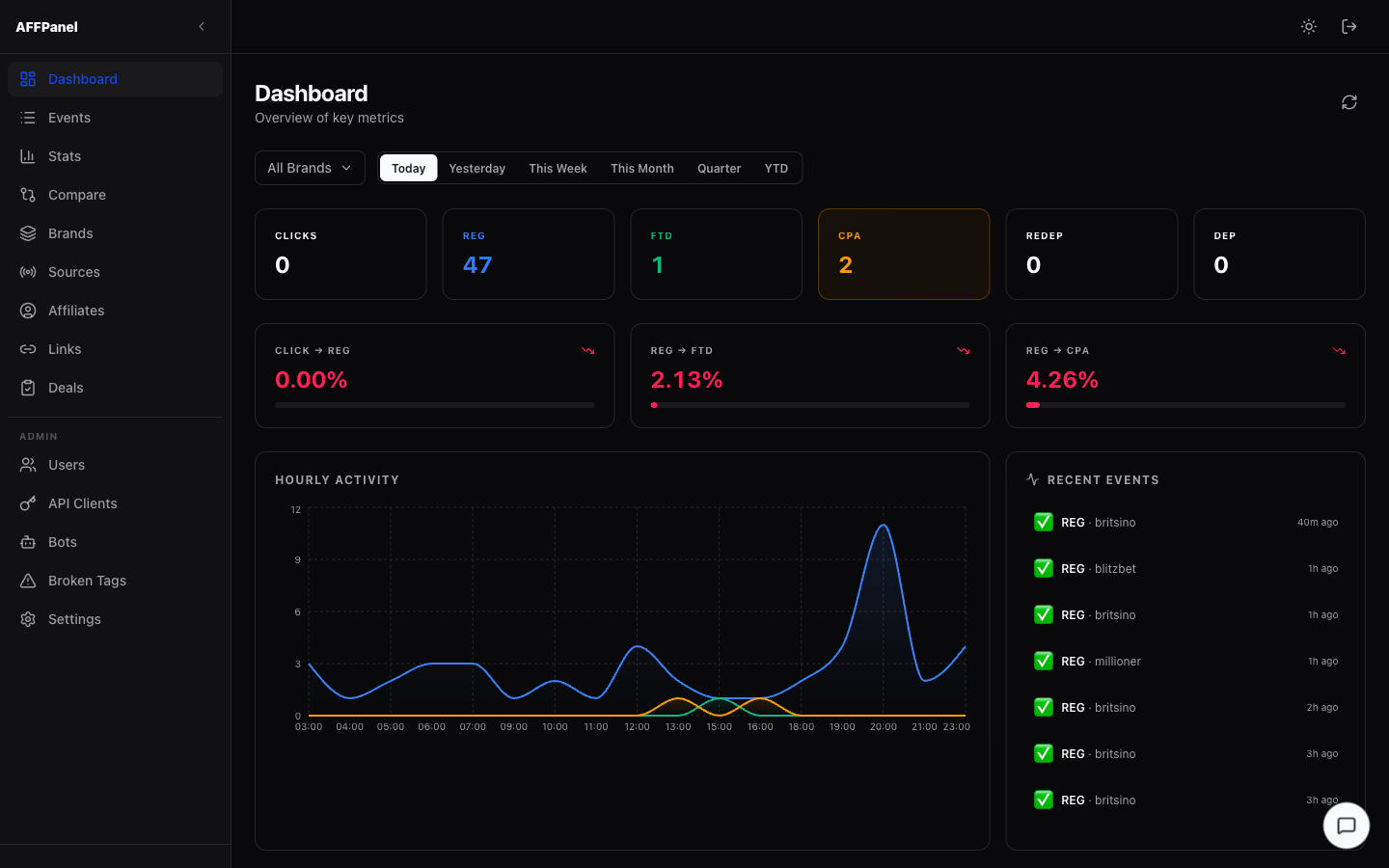
Filters
- Brand selector — scope all metrics to a single brand or view all brands combined.
- Period pills — Today · Yesterday · This Week · This Month · Quarter · YTD. Switching a period re-fetches all cards and the chart instantly.
KPI Cards
The CPA card has an amber highlighted border — it is the primary conversion metric. A Revenue card appears beneath if CPA revenue > 0 for the selected period.
Conversion Rate Cards
| Card | Formula | Color logic |
|---|---|---|
| Click → REG | REG / Clicks | Green if above threshold, red if below |
| REG → FTD | FTD / REG | Green if above threshold, red if below |
| REG → CPA | CPA / REG | Green if above threshold, red if below |
Each card also contains a progress bar that visualises the rate relative to 100%.
Activity Chart
Area chart (occupies the left two-thirds of the lower section). Plots REG (blue), FTD (green), CPA (amber) over time. Granularity: hourly for Today/Yesterday, daily for all other periods. Hover over the chart to see exact values in a tooltip.
Recent Events Feed
Right panel — last 15 events across all brands, newest first. Each row shows an event type badge, brand name, and time-ago label. Refreshes automatically when you bring the browser tab back into focus.
/events — Full postback event log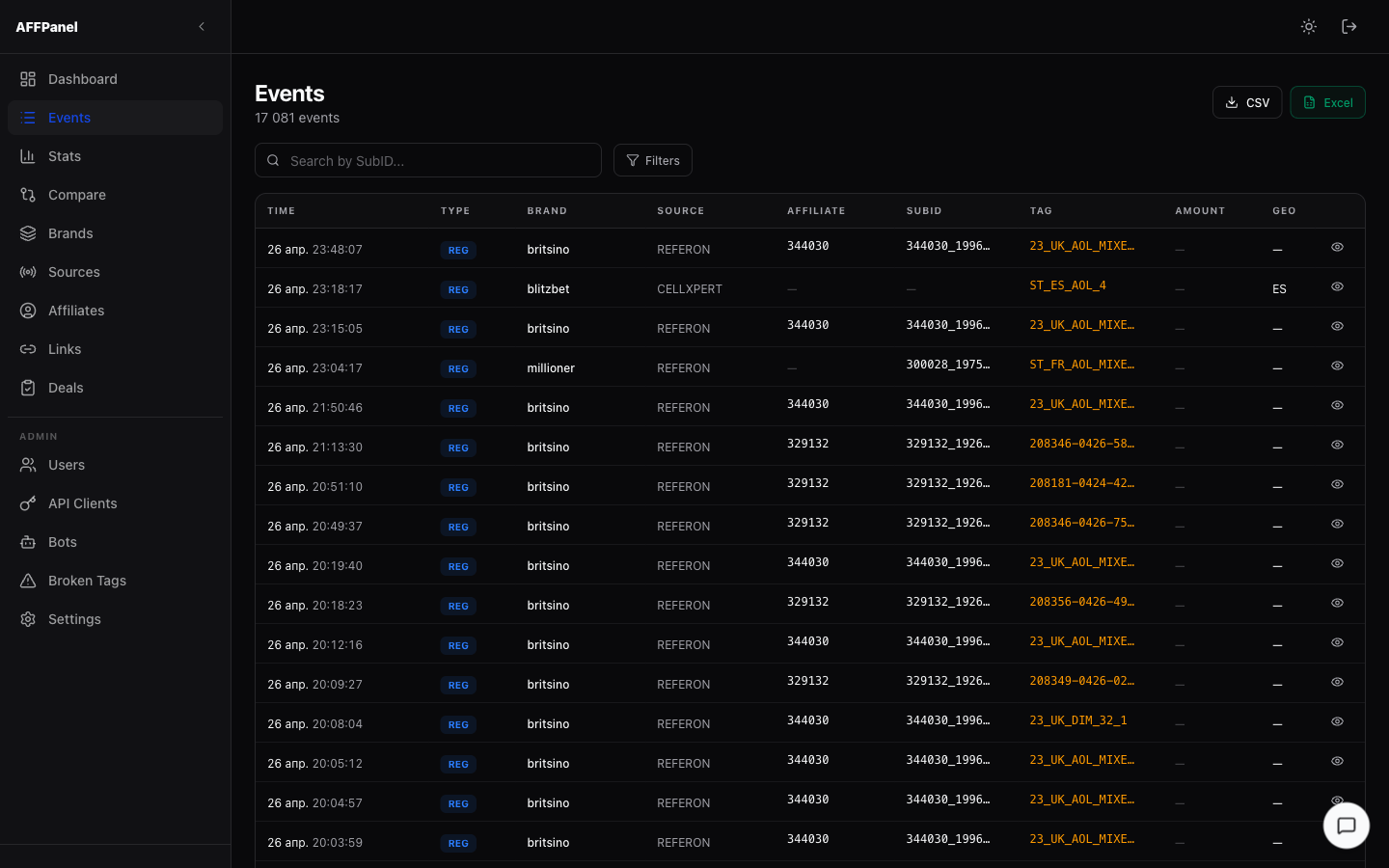
Table Columns
| Column | Description |
|---|---|
| Time | Date + local time of the postback |
| Type | Colored badge: REG FTD CPA DEP CLICK REDEP |
| Brand | Casino brand slug (e.g. britsino) |
| Source | Affiliate network (REFERON, CELLXPERT, etc.) |
| Affiliate | Affiliate ID from the postback |
| SubID | Campaign sub-ID |
| Tag | Tracking tag value — shown in amber |
| Amount | Payout amount + currency |
| GEO | ISO country code (e.g. ES) |
| 👁 | Opens the detail side panel |
Search & Filters
- Search box — type a SubID and press Enter to filter by it.
- Filters panel — click the Filters button to expand additional options:
| Filter | Values |
|---|---|
| Brand | Dropdown with all brands |
| Event Type | CLICK / REG / FTD / DEP / REDEP / CPA (multi-select) |
| From / To | Date range pickers |
| Test Events | All · Production only · Test only |
| Source | Free text (e.g. AFFISE) |
| Tracking Tag | Free text (e.g. WA_FR_DIM_20) |
Active filter count is shown as a badge on the Filters button. Click Clear to reset all filters.
Export
- CSV — downloads the current filtered set as
.csv - Excel — same data as
.xlsx
Event Detail Panel
Click any row (or the 👁 icon) to open a right-side detail panel with all raw fields: Event ID, Time, Brand, Source, Raw Event, Affiliate ID, SubID, External UID, Transaction ID, Tracking Tag, Traffic Source, Country, Amount, Test flag. Click the backdrop or × to close.
Pagination
Page size: 50 events. Page numbers appear below the table with a sliding window of up to 7 visible buttons at once.
/stats — Detailed analytics with charts & breakdowns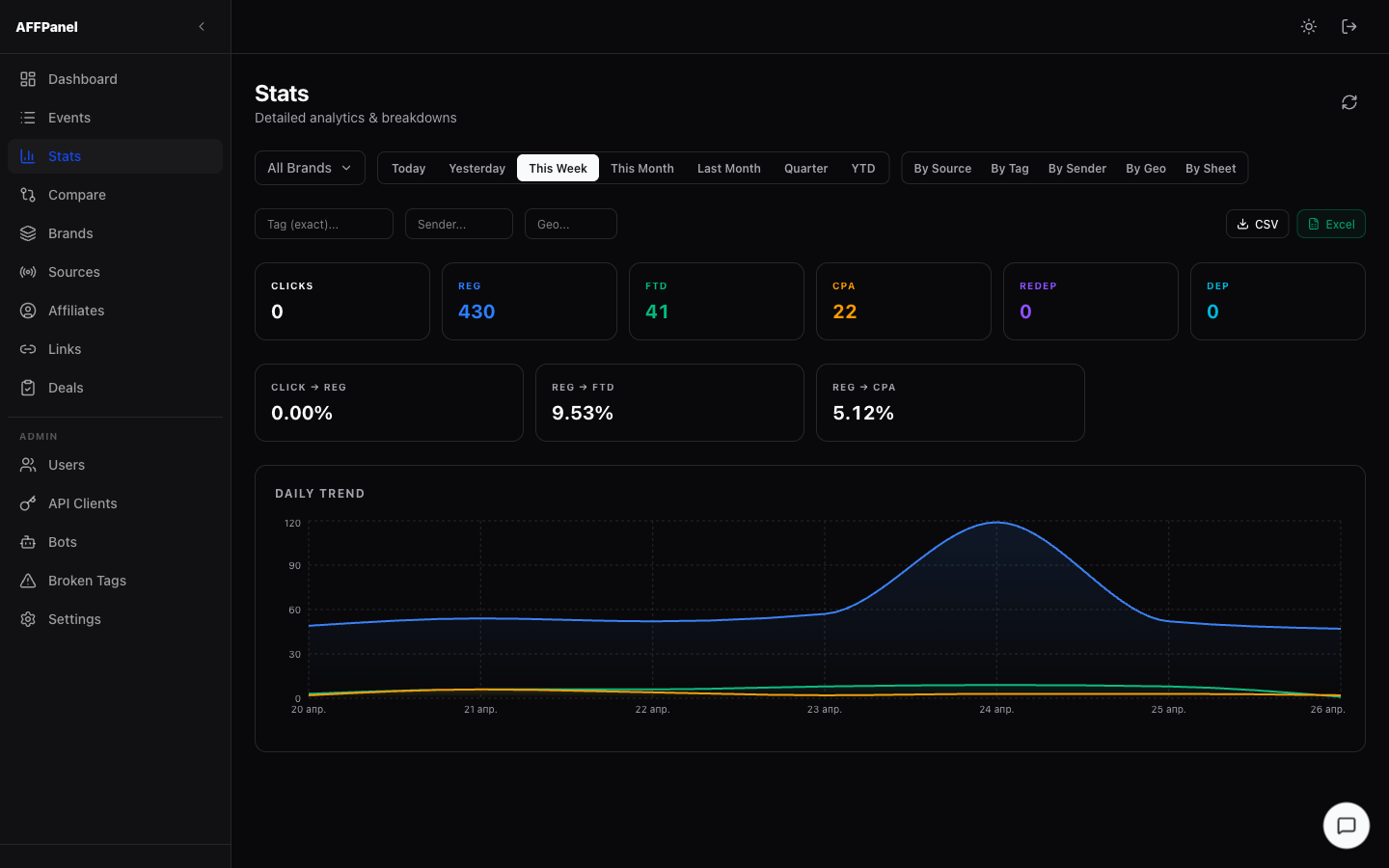
Filters
- Brand selector — scope to a specific brand
- Period pills — Today · Yesterday · This Week · This Month · Last Month · Quarter · YTD
- Dimension buttons — switch the breakdown table:
| Dimension | Groups data by |
|---|---|
| By Source | Affiliate network (REFERON, CELLXPERT, etc.) |
| By Tag | Tracking tag value |
| By Sender | Telegram bot / sender ID |
| By Geo | Country code |
| By Sheet | Internal sheet grouping |
When By Tag, By Sender, or By Geo is active, additional text filter fields appear to narrow the results.
KPI Summary
Same 6 cards as Dashboard: Clicks, REG, FTD, CPA, REDEP, DEP — plus 3 conversion rate cards (Click→REG, REG→FTD, REG→CPA).
Time-Series Chart
Area chart (DAILY TREND) showing REG, FTD, CPA over the selected period. Hourly granularity for Today/Yesterday, daily for all other periods.
Breakdown Table
Rows grouped by the selected dimension. Each row shows: Clicks, REG, FTD, CPA, REDEP, DEP, and conversion rates.
Export
CSV and Excel buttons export the full filtered dataset.
/compare — Period-over-period comparison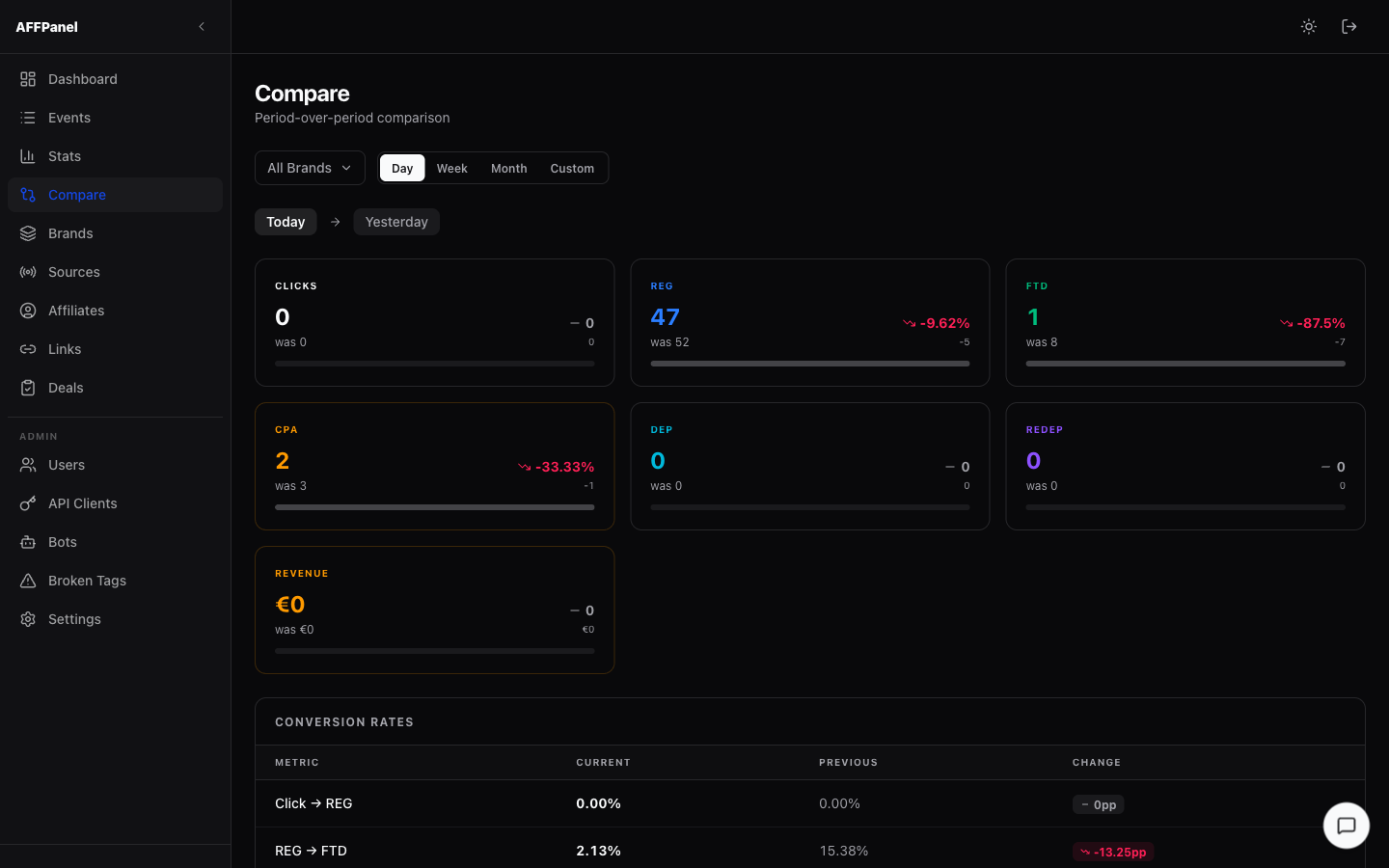
Comparison Modes
| Mode | What it compares |
|---|---|
| Day | Today vs Yesterday |
| Week | This Week vs Last Week |
| Month | This Month vs Last Month |
| Custom | Two specific dates — date pickers appear |
Metric Cards
One card per metric: Clicks, REG, FTD, CPA, DEP, REDEP, Revenue. Each card shows:
- Current period value (large number)
- Previous period value (shown as "was X")
- Delta — absolute change (e.g. -5)
- Delta % with trend arrow — ↑ green / ↓ red / → neutral
- Progress bar comparing current vs previous visually
Conversion Rates Table
Below the cards: a table showing Click→REG, REG→FTD, REG→CPA rates for both periods with the change in percentage points.
/brands — All brands that have received events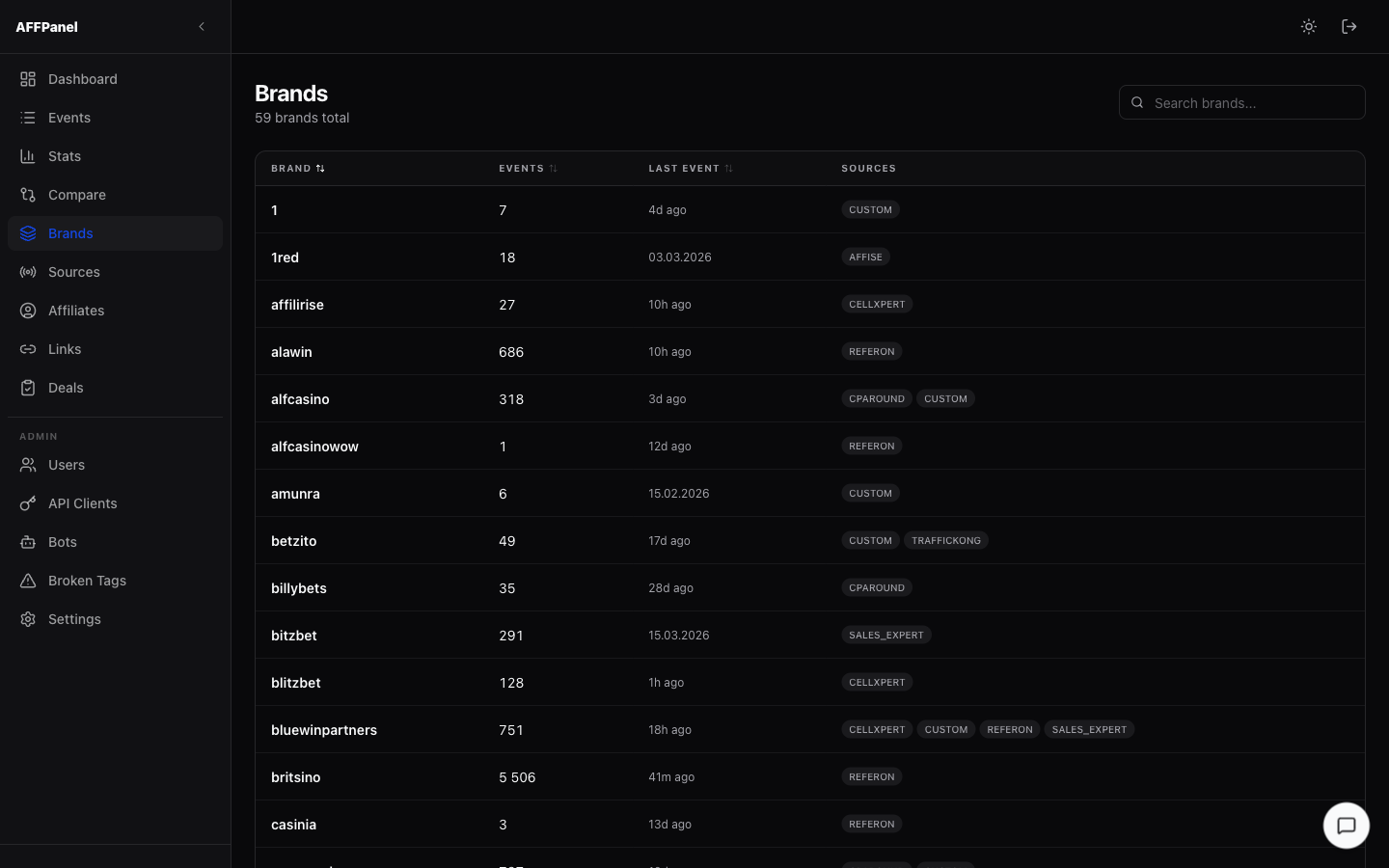
Table Columns
| Column | Description |
|---|---|
| Brand | Brand slug (sortable A→Z) |
| Events | Total event count (sortable) |
| Last Event | Relative time of most recent event (sortable) |
| Sources | Affiliate networks active for this brand — shown as chips |
Search & Sort
- Search box (top-right) — filters the brand list in real-time by brand name
- Click any column header to sort; click again to reverse
/sources — Performance breakdown by affiliate network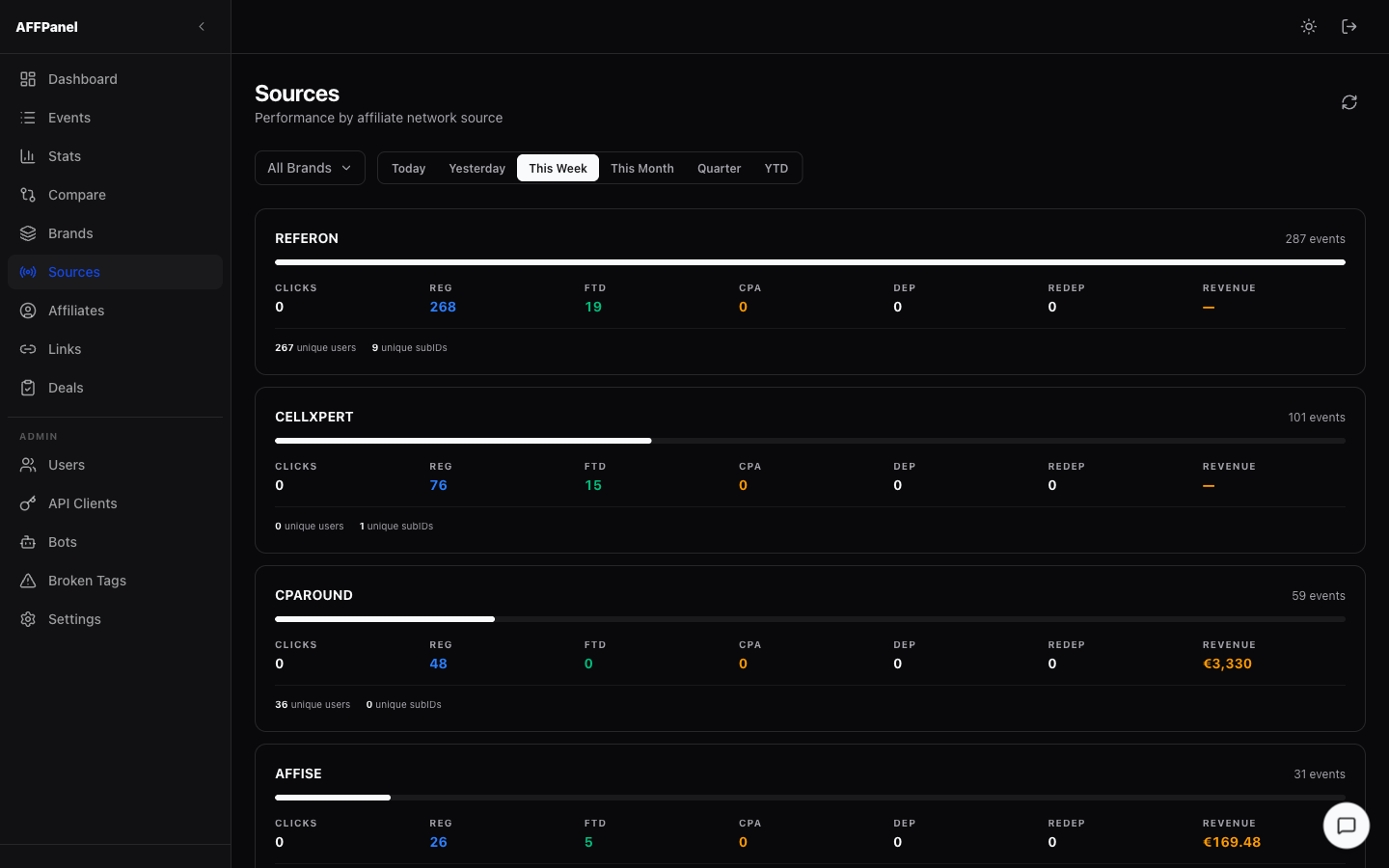
Filters
- Brand — scope to a single brand
- Period — Today · Yesterday · This Week · This Month · Quarter · YTD
Source Cards
One card per affiliate network. Each card displays:
- Source name (e.g. REFERON)
- Event count (top-right)
- Relative volume bar — shows this source's share of total events across all sources
- Metrics row: Clicks · REG · FTD · CPA · DEP · REDEP · Revenue
- Unique users and unique subIDs count
/affiliates — Per-affiliate performance report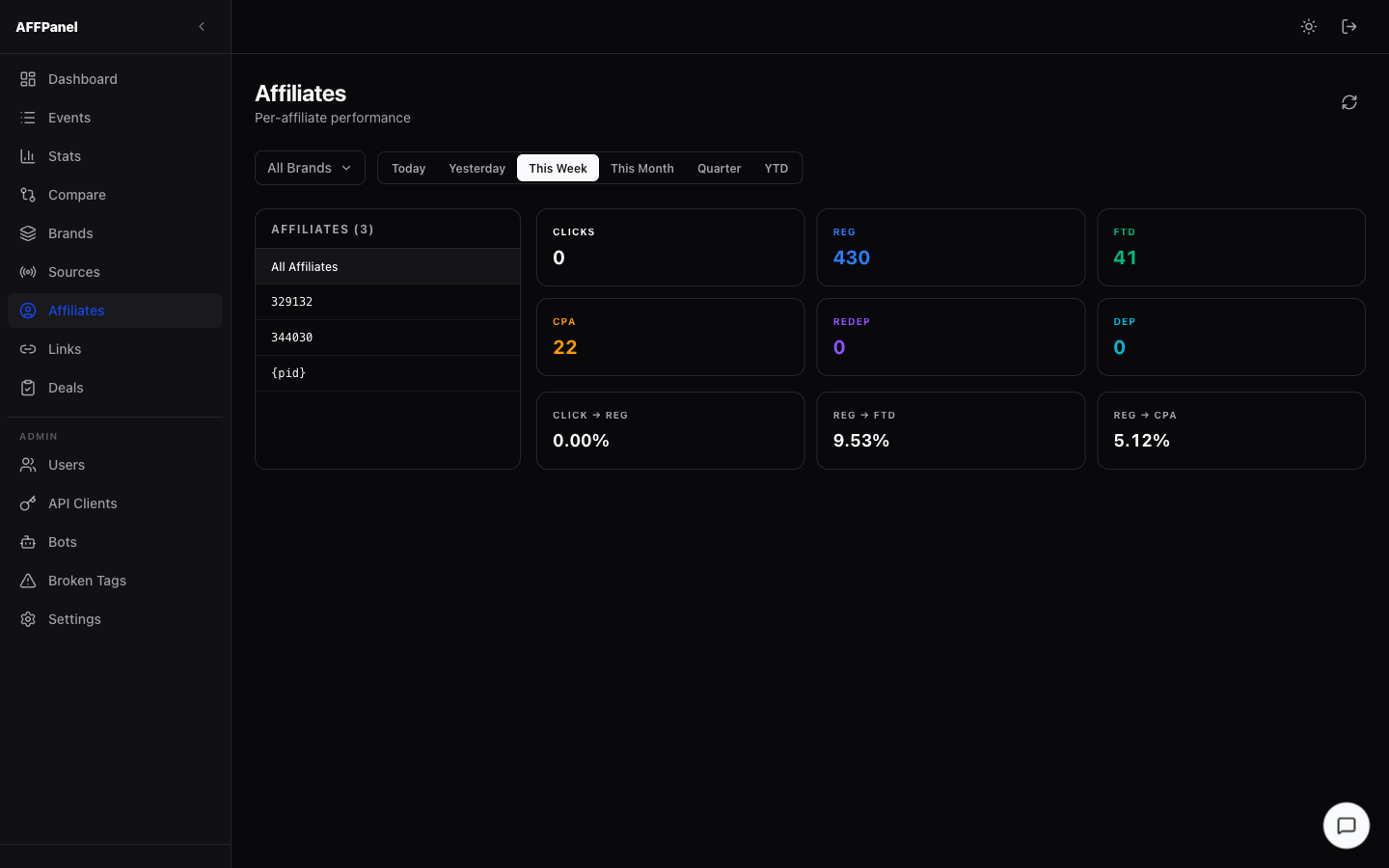
Layout
- Left panel — scrollable list of all known affiliate IDs. All Affiliates at the top resets to the aggregate view. Click any affiliate ID to drill down.
- Right panel — 6 KPI cards (Clicks, REG, FTD, CPA, REDEP, DEP) + 3 conversion rate cards for the selected affiliate (or all if none selected).
Filters
- Brand — scope metrics to a single brand
- Period — Today · Yesterday · This Week · This Month · Quarter · YTD
/links — Postback URL generator for affiliate platforms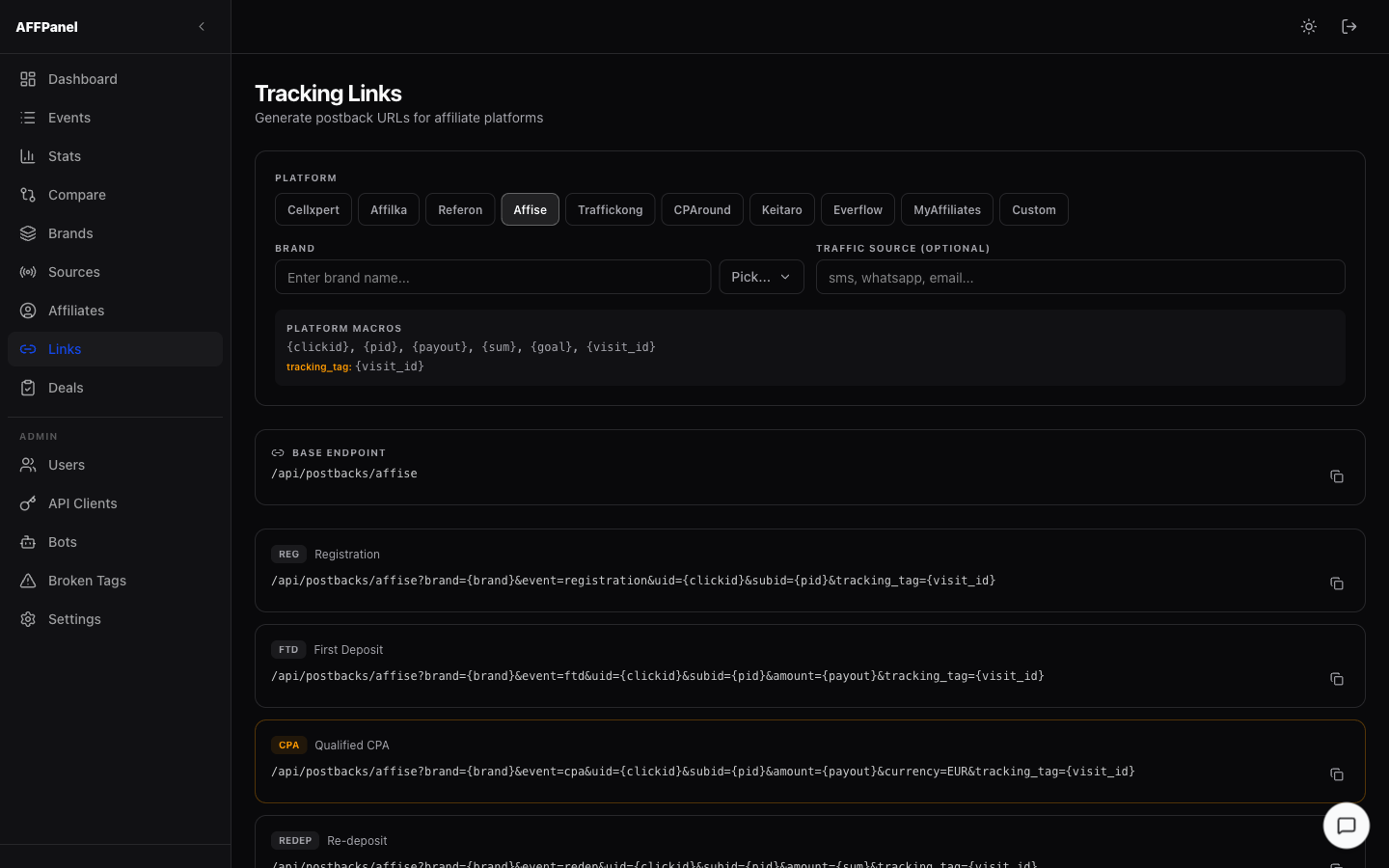
How to Generate Links
- Pick a Platform — click one of the platform chips: Cellxpert · Affilka · Referon · Affise · Traffickong · CPAround · Keitaro · Everflow · MyAffiliates · Custom
- Enter a Brand — type the brand slug or select from the dropdown
- Traffic Source (optional) — add a label like
sms,whatsapp, oremail— it's appended as&source=to every URL
Macro Reference Box
Appears automatically after selecting a platform. Shows the platform's available macros (e.g. {clickid}, {pid}) and highlights which macro maps to tracking_tag.
Generated URL Blocks
One block per event type (REG, FTD, CPA, REDEP — availability depends on platform). The CPA block has an amber border to mark it as the primary conversion. Each URL has a copy button that turns green for 2 seconds on click.
Base Endpoint
The raw /api/postbacks/<route> URL for the selected platform — useful for manual postback testing.
/deals — Data quality audit across brands & networks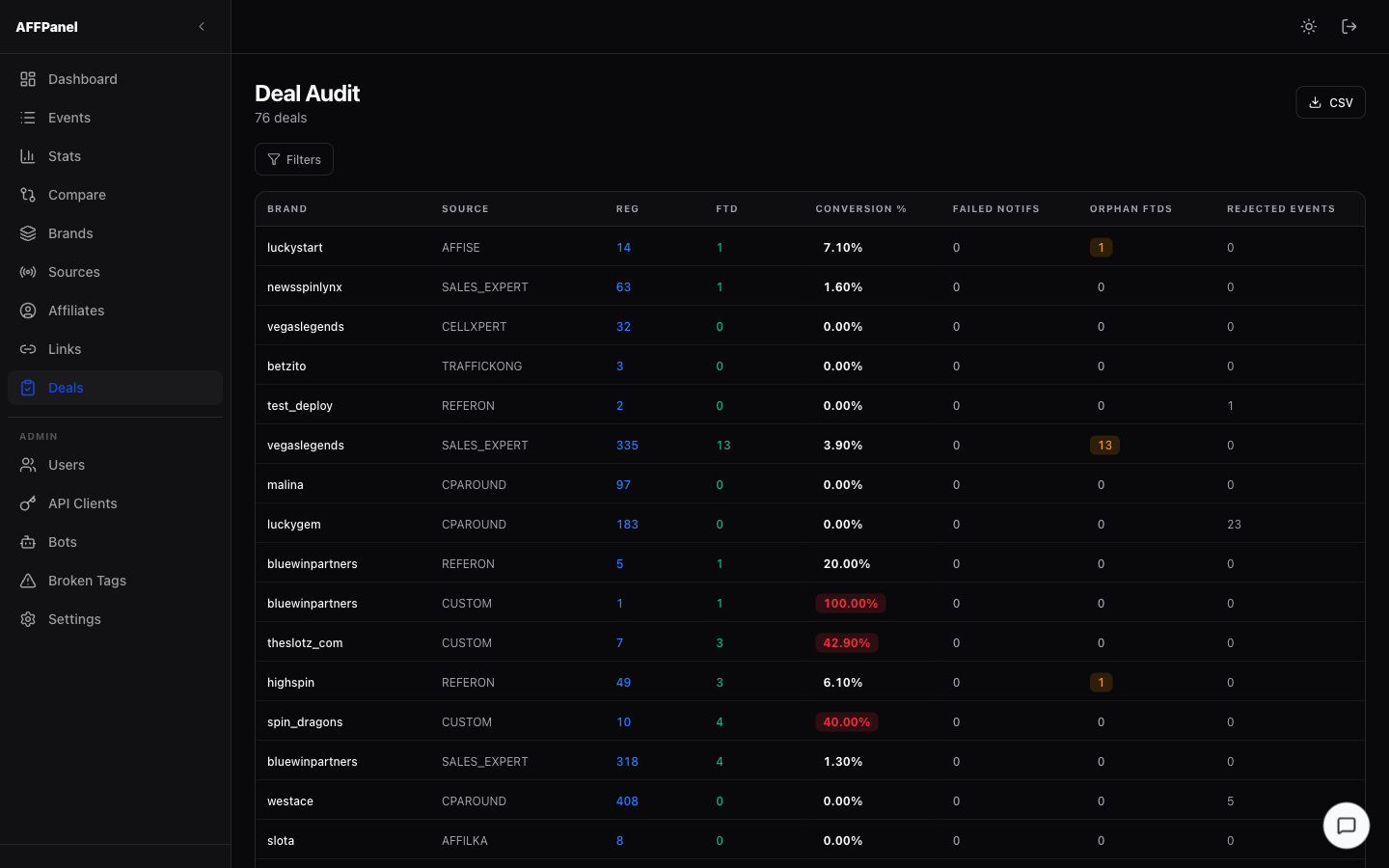
The Deal Audit page helps identify data integrity issues between brands and affiliate networks.
Table Columns
| Column | Description |
|---|---|
| Brand | Brand slug |
| Source | Affiliate network |
| REG | Registration count (blue) |
| FTD | First deposit count (green) |
| Conversion % | FTD/REG ratio — red badge if > 25% (suspicious) |
| Failed Notifs | Postback delivery failures — red if > 0 |
| Orphan FTDs | FTDs with no matching REG — amber badge if > 0 |
| Rejected Events | Events rejected by the router |
Filters, Sort & Export
- Filters — click the Filters button to expand: From date · To date · Brand · Source
- Sorting — click any column header; click again to reverse
- Search — global text filter by brand or source name
- Export CSV — downloads all visible rows
/settings/users — Manage backoffice access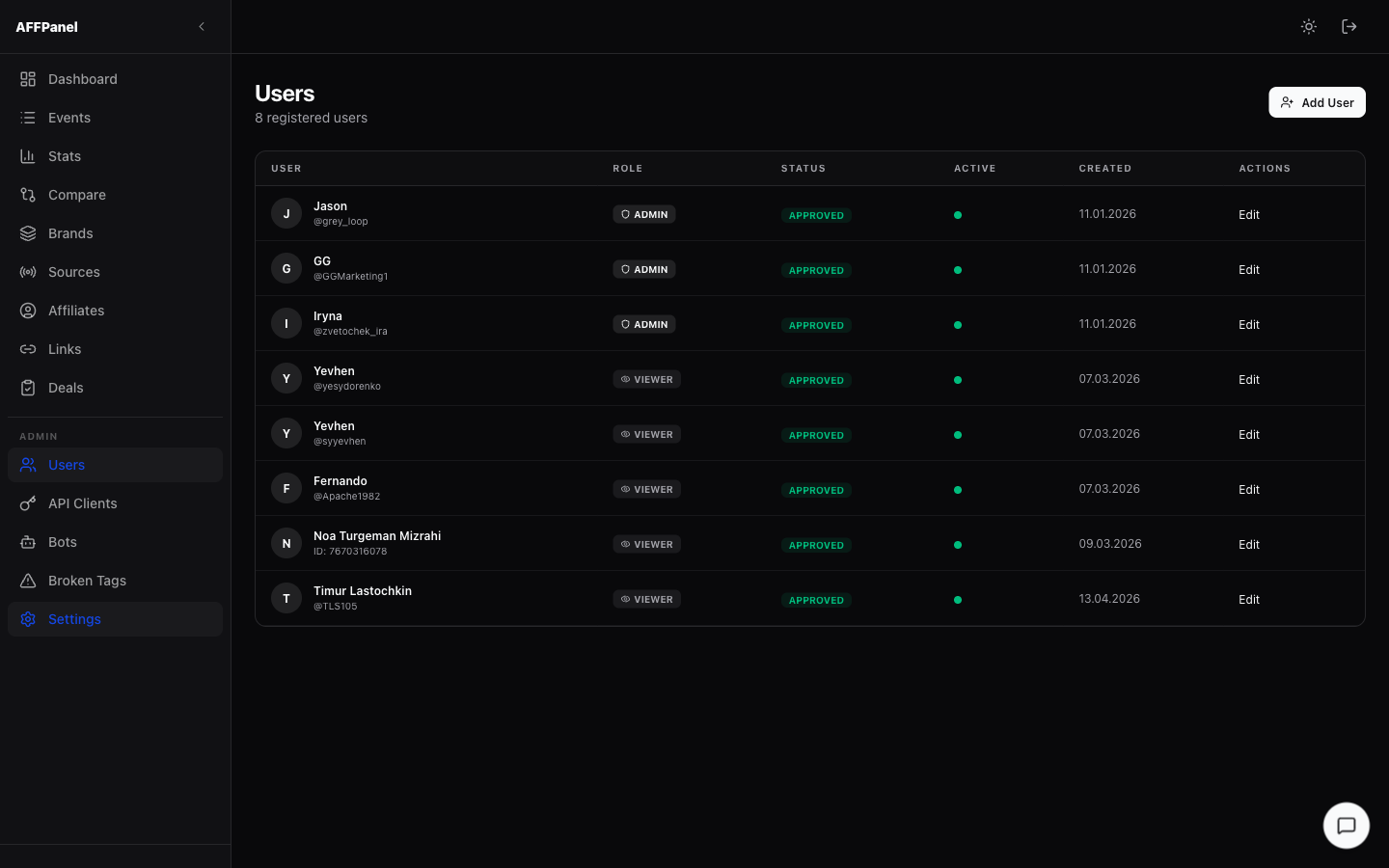
admin role.
User List Columns
| Column | Description |
|---|---|
| User | Avatar/initials · Full name · @username or Telegram ID |
| Role | ADMIN or VIEWER |
| Status | APPROVED · PENDING · REJECTED |
| Active | Green dot = active session |
| Created | Registration date |
| Actions | Edit button opens the user detail panel |
Roles
| Role | Access |
|---|---|
admin | Full access including Users, Bots, Broken Tags pages |
viewer | Read-only; Admin section is hidden |
User Actions (Edit panel)
- Approve — changes status to Approved, grants login access
- Reject — blocks access
- Change Role — toggle between admin and viewer
- Brand Subscriptions — limit which brands trigger bot notifications for this user
- Affiliate Subscriptions — limit which affiliate IDs trigger notifications
- Delete — removes the user entirely
Add User
Click Add User (top-right). Fill in: Telegram ID · First name · Last name · Username · Role. The user is created immediately and can log in as soon as their status is Approved.
/settings/api-clients — Bearer tokens for external integrations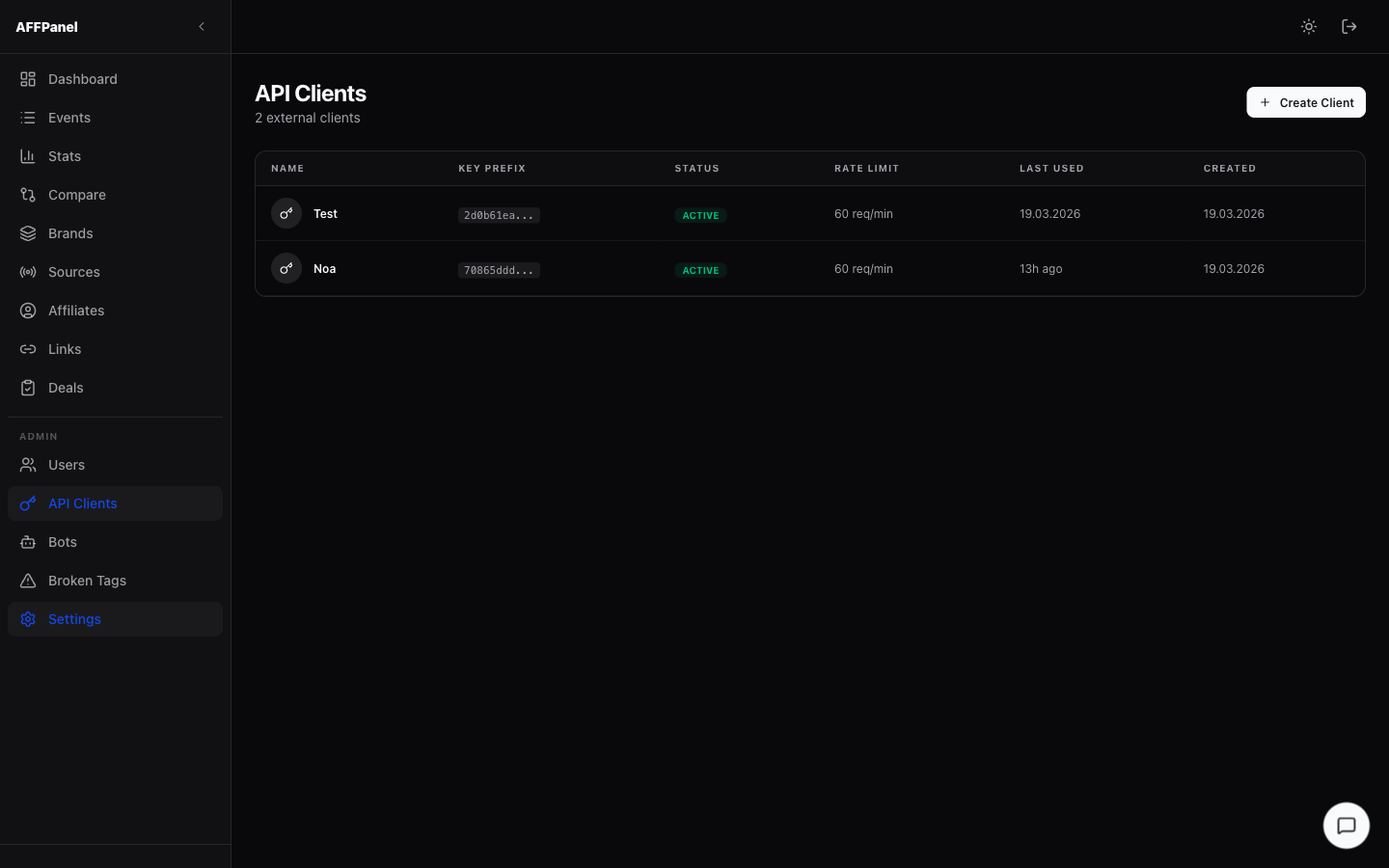
API clients allow external systems (CRM hooks, custom dashboards, scripts) to authenticate against the AFFPanel API using a bearer token.
Table Columns
| Column | Description |
|---|---|
| Name | Client display name |
| Key Prefix | First 8 characters of the token (masked) |
| Status | ACTIVE or inactive |
| Rate Limit | Requests per minute (default 60 req/min) |
| Last Used | Last API call timestamp |
| Created | Creation date |
Create a Client
- Click Create Client (top-right)
- Enter a client name
- The full token is shown once — copy it immediately, it cannot be retrieved again
/settings/bots — Telegram notification bots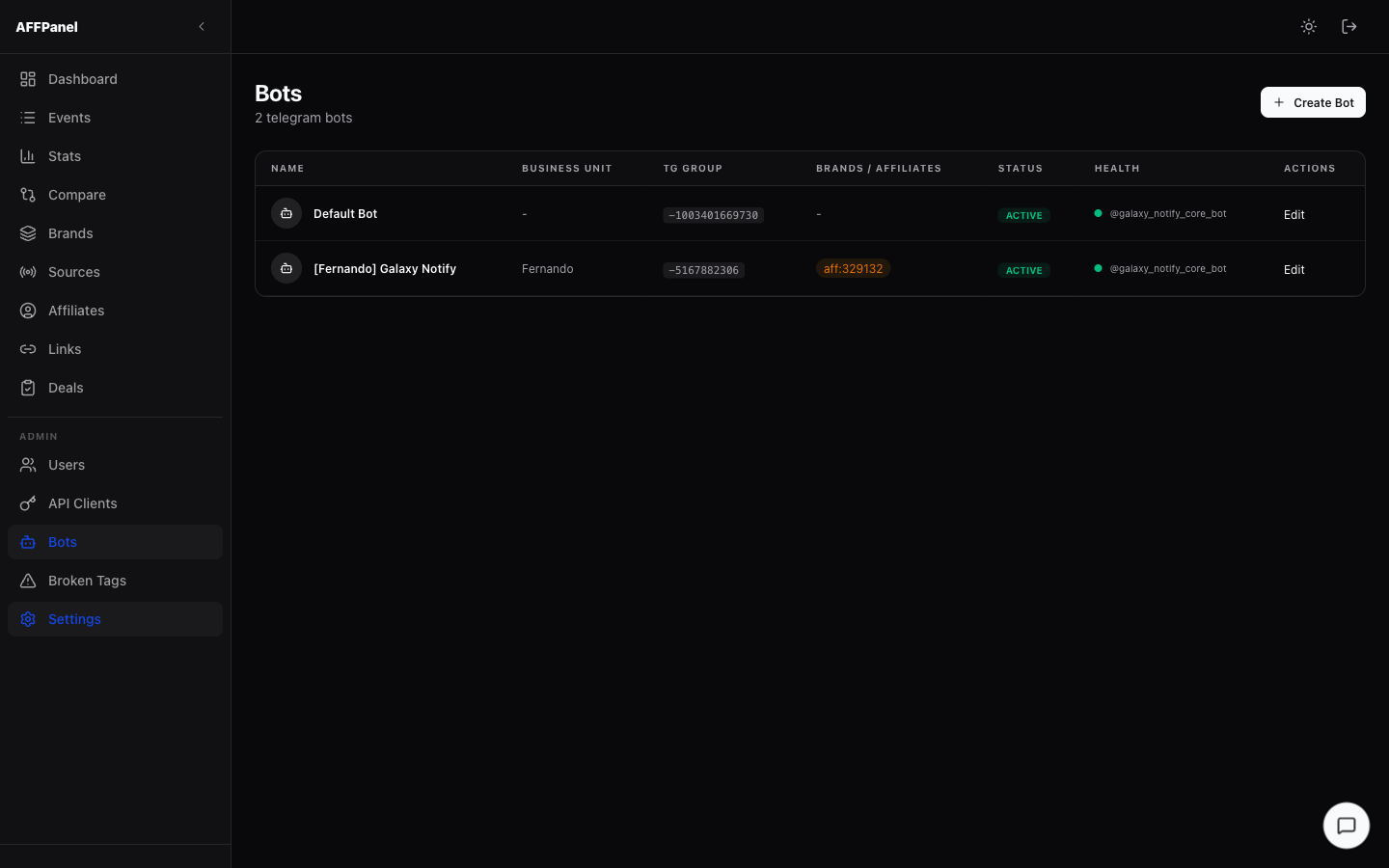
Bots send Telegram messages to a group or chat whenever a tracked event occurs (REG, FTD, CPA, etc.).
Bot List Columns
| Column | Description |
|---|---|
| Name | Display name of the bot |
| Business Unit | Optional team/unit label |
| TG Group | Telegram Chat/Group ID the bot posts to |
| Brands / Affiliates | Scope chips — orange = affiliate filter active, otherwise all |
| Status | ACTIVE or INACTIVE |
| Health | 🟢 online / 🔴 offline / pulsing grey = checking |
| Actions | Edit button |
Create a Bot
- Click Create Bot (top-right)
- Enter: Name · Telegram Bot Token · Telegram Chat/Group ID · Business Unit (optional) · Active toggle
- Save
Bot Detail Panel (Edit)
Click a bot row to expand the edit panel:
- Edit tab — change name, token, chat ID, business unit, active toggle
- Brands tab — multi-select list of brands. Bot fires only for selected brands. Empty = all brands.
- Affiliates tab — comma-separated affiliate IDs. Bot fires only for listed affiliates. Empty = all.
- Dead Letters tab — queue of failed notification deliveries. Shows error reason + timestamp. Retry button re-attempts individual messages.
/admin/broken-tags — Misconfigured postback tracking tags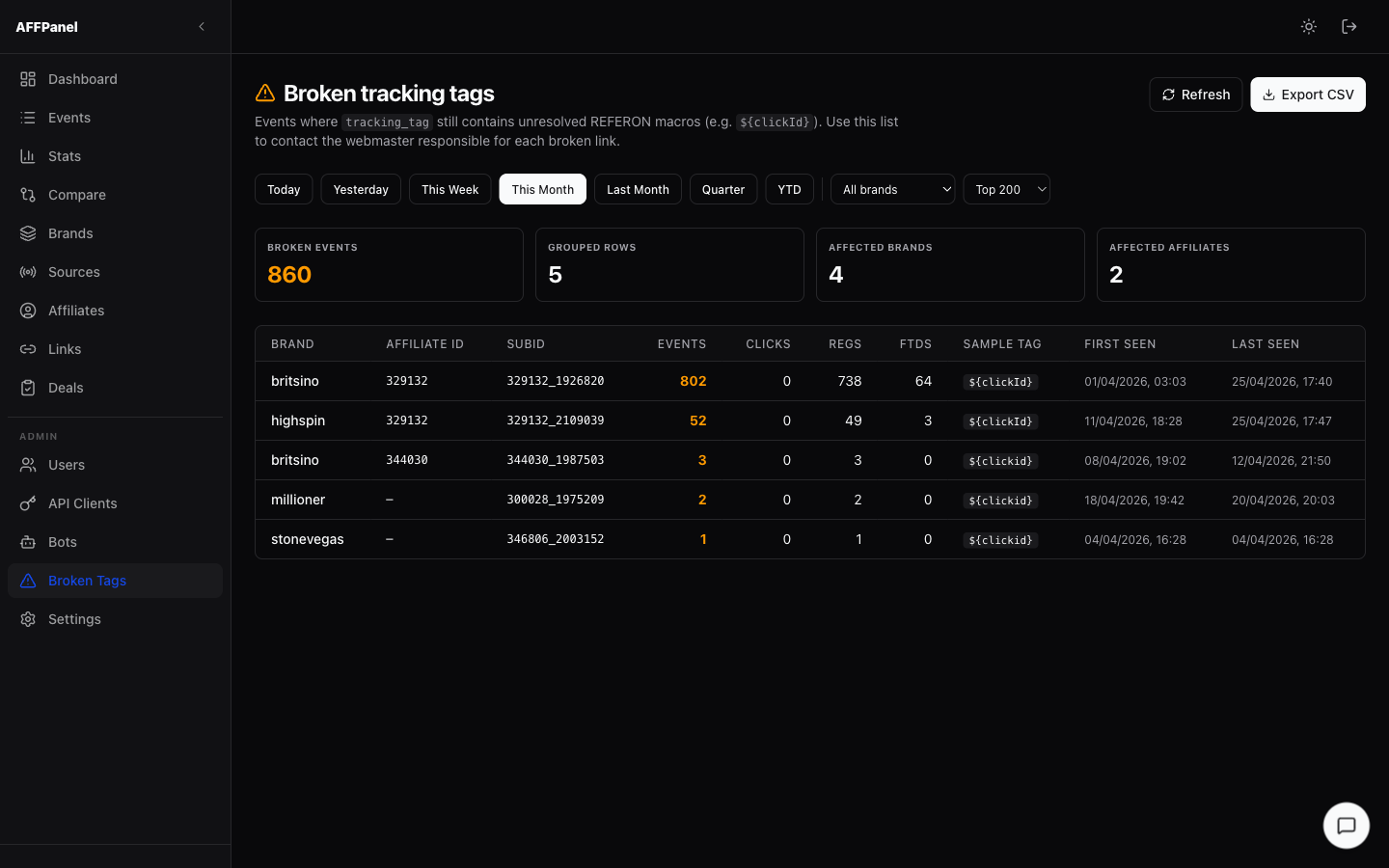
Shows tracking tags that arrived in postbacks but contain unresolved macros (e.g. ${clickId} was never substituted). This indicates a misconfigured postback URL on the affiliate side.
Summary Cards
Table Columns
| Column | Description |
|---|---|
| Brand | Brand that received the broken event |
| Affiliate ID | Resolved affiliate (may be empty) |
| SubID | Sub-ID from the postback |
| Events | Total occurrences — amber/red if high |
| Clicks | Click events for this tag |
| REGs | Registrations on this tag |
| FTDs | First deposits on this tag |
| Sample Tag | Example raw tracking_tag value showing the broken macro |
| First Seen | Timestamp of first occurrence |
| Last Seen | Timestamp of most recent occurrence |
Filters
- Period — Today · Yesterday · This Week · This Month · Last Month · Quarter · YTD
- Brand — dropdown
- Limit — top N rows (default 200)
${clickId}), then contact the webmaster responsible for the affiliate link to fix the postback URL template.
/settings — System status & diagnostics (read-only)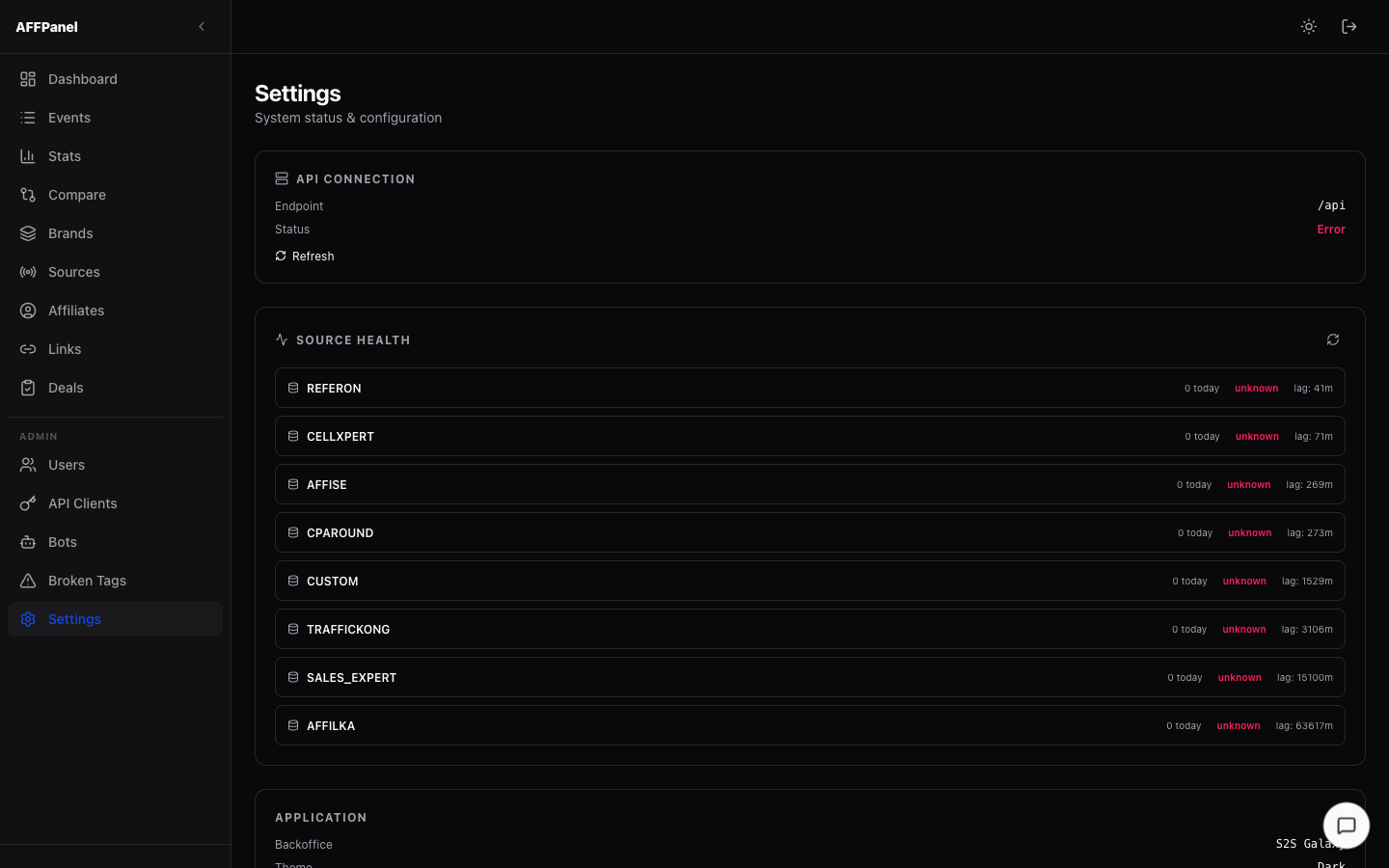
API Connection Card
- Endpoint — backend API base URL
- Status — Connected (green) / Error (red)
- Refresh — re-checks the API connection
Source Health Card
One row per registered event source. Columns:
| Field | Values |
|---|---|
| Source | Network name (REFERON, CELLXPERT, etc.) |
| Events today | Count of events received today |
| Status | healthy · warning · error · unknown |
| Lag | How many minutes behind real-time the source is |
Application Card
Read-only info: App name (S2S Galaxy), theme (Dark), auth method.
| Badge | Full Name | Typical Trigger |
|---|---|---|
| CLICK | Click | Player clicks an affiliate tracking link |
| REG | Registration | Player completes sign-up on the brand site |
| FTD | First Deposit | Player makes their very first deposit |
| DEP | Deposit | Any deposit (first or repeat) |
| REDEP | Re-deposit | Repeat deposit (after the first) |
| CPA | Qualified CPA | Player meets the CPA qualification criteria defined by the deal |
| Preset | Range |
|---|---|
| Today | 00:00 UTC — now |
| Yesterday | Full previous calendar day (00:00–23:59 UTC) |
| This Week | Monday 00:00 UTC — now |
| This Month | 1st of current month 00:00 UTC — now |
| Last Month | Full previous calendar month |
| Quarter | 1st of the current quarter — now |
| YTD | Jan 1 00:00 UTC — now |
AFFPanel — S2S Galaxy Backoffice · Documentation generated 2026-04-26